
Email Integration
Send and receive mail, work with folders, flag messages, find messages by sender, and keep communication beside the rest of your daily planning.
Back to featuresYour feedback is very important. The first 5 people to send me feedback will get a 6-month subscription for free. This includes enhancements, what doesn’t work well, what works well, etc. The feedback has to be meaningful to be considered.
Calixy Organizer for Windows
A focused Windows organizer that brings email, tasks, To Do lists, calendars, contacts, passwords, and AI help together in one desktop application.
The trial starts on first use. After 30 days, a license key is required to continue.
30-day free trial
Try the application before purchasing.
$29.99 license
Includes 1 year of free upgrades, then your purchased version remains perpetual.
Built for Windows
A desktop organizer that stays close at hand.
Each feature below opens a matching detail section, so the overview and the full Features page stay in sync.
A closer look at every feature in the Calixy Organizer feature list.
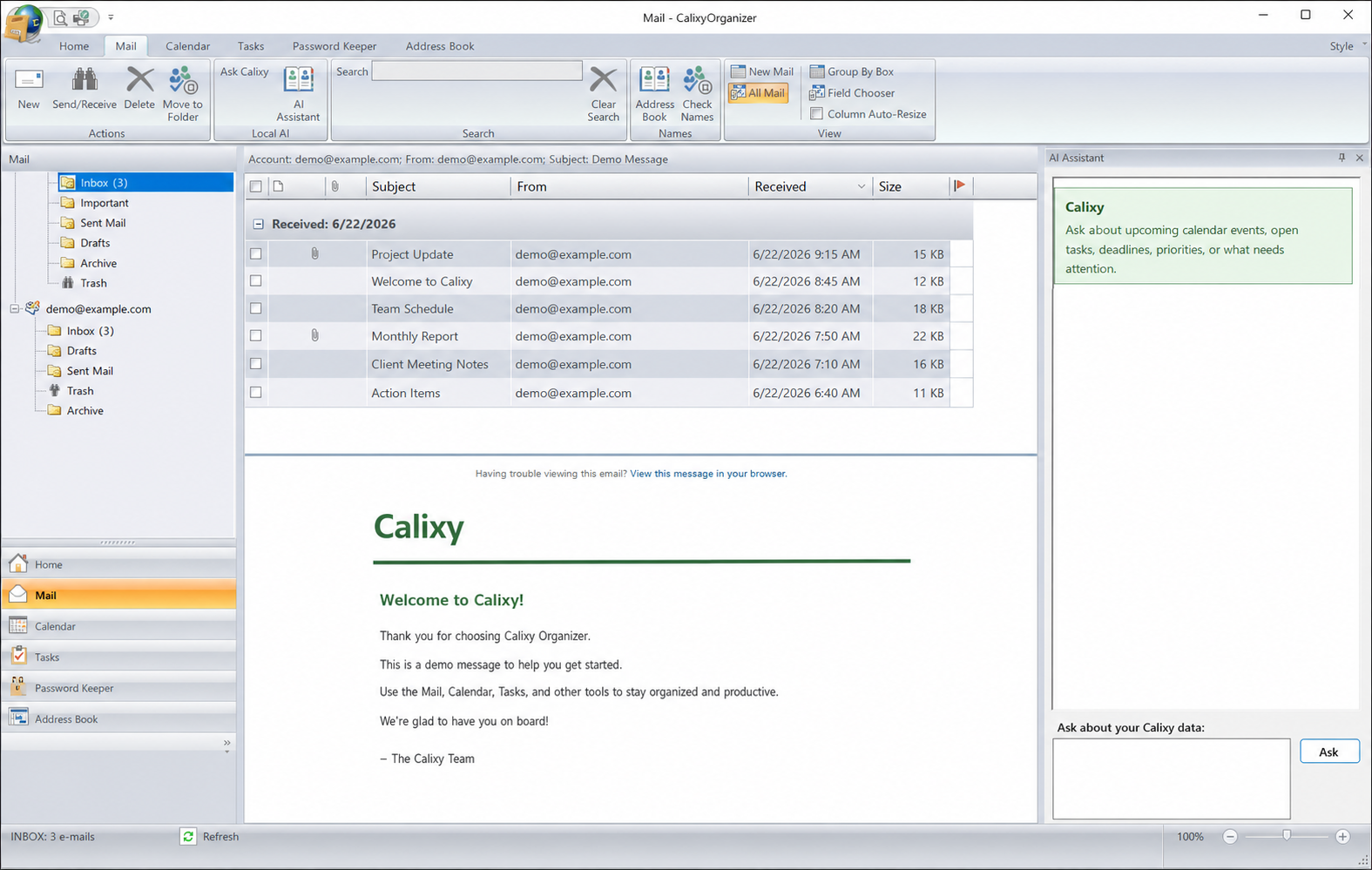
Send and receive mail, work with folders, flag messages, find messages by sender, and keep communication beside the rest of your daily planning.
Back to featuresThe Calixy tray watches for incoming mail and notifies you from Windows, so your inbox can stay visible without taking over your desktop.
Back to featuresConfigure incoming and outgoing servers, SSL/TLS and STARTTLS, account testing, provider detection, and OAuth support where available.
Back to featuresCompose with To, CC, and BCC fields, attachments, signatures, business cards, calendar items, HTML/plain-text formatting, and sender account selection.
Back to featuresUse contacts while composing email and maintain names, addresses, phone numbers, websites, and notes in one place.
Back to featuresKeep outgoing messages consistent with saved signature text and contact information you can reuse across compose sessions.
Back to featuresAttach contact cards to messages and use vCard-style details for sharing and importing contact information.
Back to featuresMove, copy, delete, mark as read, or flag messages automatically so routine inbox handling takes less effort.
Back to featuresIdentify unwanted messages with spam analysis, manage blocked and trusted senders, and use spam and not-spam controls to improve inbox sorting.
Back to featuresCalixy includes AI assistance inside the desktop organizer, including mail-focused help and local Ollama support when enabled.
Back to featuresSet an Ollama server URL, choose or download models, and use local AI features without leaving the organizer workflow.
Back to featuresManage task details from the same workspace as your mail and calendar so planning and follow-up stay connected.
Back to featuresUse focused lists for small items that should not get lost beside larger tasks, messages, and appointments.
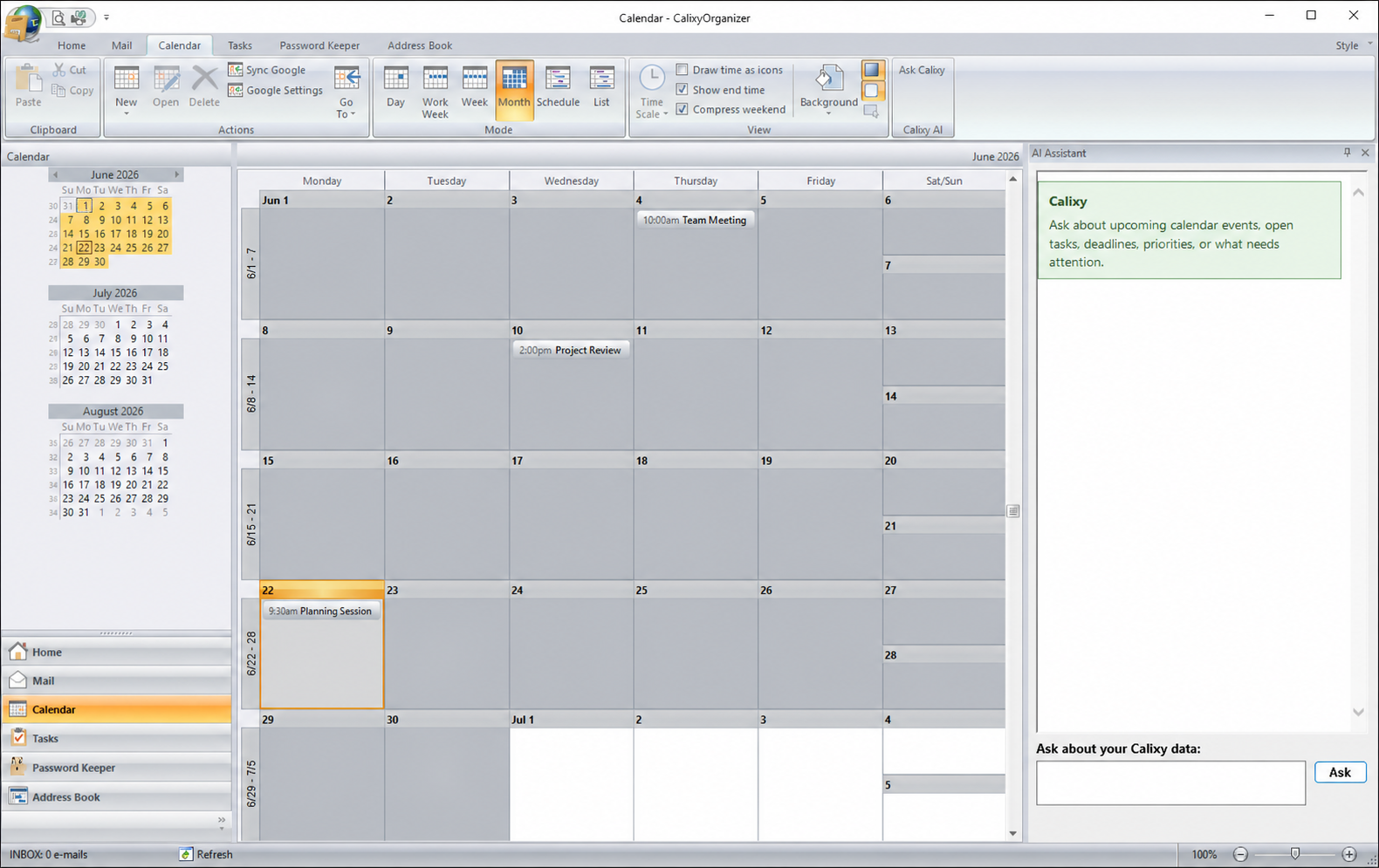
Back to featuresUse day, week, work-week, month, timeline, and scheduling tools to keep your calendar visible beside daily work.
Back to featuresSync calendar events with Google Calendar so plans stay connected between your desktop organizer and Google calendar.
Back to featuresKeep login information protected and available inside the organizer instead of scattering credentials across separate tools.
Back to featuresUse the built-in generator from the Password Keeper workflow when a new password needs to be created.
Back to featuresUse the main organizer view to open mail, tasks, calendar items, contacts, passwords, and other commonly used areas.
Back to featuresFind mail by sender, show flagged mail, show mail with attachments, search cached mail, and filter organizer data.
Back to featuresAttach files to outgoing messages, save received attachments, and work with messages that include attached files.
Back to featuresCustomize mail list and body colors, and use category-style rules to highlight messages from important senders or domains.
Back to featuresAdjust send/receive intervals and server timeout settings so slow or unavailable mail servers are easier to manage.
Back to featuresCalixy Organizer is built as a Windows desktop application designed to stay available throughout the day.
Back to featuresUse Calixy Organizer during the 30-day trial. After the trial expires, the app prompts for a valid purchased license key to continue.
Back to featuresThese are privacy-safe captures of the current Calixy Organizer interface, showing integrated mail, Google Calendar tools, navigation, and the built-in AI assistant.
Start free
Download the Windows installer and begin the trial on first use. Calixy shows the remaining trial time inside the application.
Continue with Calixy
$29.99
Purchase the current Calixy Organizer version securely through WooCommerce. Your license includes free upgrades for 1 year.
After the upgrade year ends, the version you purchased does not expire. To upgrade after that year, purchase another license.
The free trial and paid license use the same installer. Your license key activates continued access after the trial.
The 30-day countdown begins when Calixy Organizer is first used.
The trial expires and Calixy asks for a valid license key before continuing.
Your purchase includes free upgrades for 1 year. After that, the version you bought remains yours and does not expire; buying another license is only needed if you want newer upgrades.
Learn repeatable ways to manage email, calendars, multiple accounts, spam filtering, and private local AI assistance.